
Faces
1727 files
-

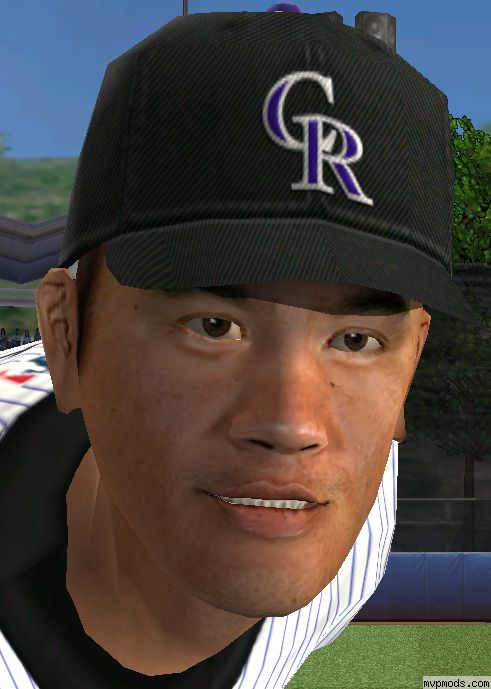
Chien-Ming Wang Cyberface Yuze+Baseballfans
By baseballfans
Chien-Ming Wang Cyberface by Yuze was redo and fixed by Baseballfans for MVPMODS.com so that it will work for MVP 2005 PC ONLY
745 downloads
(0 reviews)0 comments
Updated
-

Lance Niekro by 555
By hansse
San Francisco Giants #28 1B Lance Niekros cyber face. No Modelling.
232 downloads
(0 reviews)0 comments
Updated
-

Carlos Quentin Cyberface
Face for Diamondbacks prospect Carlos Quentin. Use supplied installer. back up and enjoy.
217 downloads
(0 reviews)0 comments
Updated
-

Brandon Inge by 555
By hansse
Detroit Tigers #15 3B Brandon Inges cyber face. No Modelling. Please change the players skin-color to "2".
271 downloads
(0 reviews)0 comments
Updated
-
 (0 reviews)
0 comments
Updated
-

Tsuyoshi Shinjo Cyberface by jogar84
By jogar84
I must admit i have been interested in the Nippon league in Japan for quite a while now and I hope someone would follow through on creating a Japanese league mod. Here is former Met and Giant, Shinjo, who is now with the Hokkaido Ham-Fighters. You can create him and add him to your free agents list if you please. I might also be doing other faces of Japanese players.
300 downloads
(1 review)0 comments
Updated
-

thr33niLs Felix Hernandez Cyberface v1.2
By thr33niL
My first update on my first Cyberface EVER! This is just a touchup for the previous Felix Cyber. I made his skintone lighter and did a little eye work. Looks tons better than the previous. Basic Install ====================== Copy all files to your MVP Baseball main folder and run the batch file. ====================== I used face ID #448 because it was open so make sure you have that available before running the batch. Then you just have to assign Felix the face number in MVPedit. Enjoy! -- thr33niL
218 downloads
(0 reviews)0 comments
Updated
-
Mike Cameron Cyberface by Baseballfans
By baseballfans
Mike Cameron 2005 Cyberface by Baseballfans Just run the installer.bat once U put all the unzipped files into MVP 2005 main folder. Do reply to this bottom link so I know the file is working. Comment and a preview @ http://www.mvpmods.com/index.php?name=Forums&file=viewtopic&t=11644 to
233 downloads
(0 reviews)0 comments
Updated
-

Juan Rivera cyberface by Jogar84
By jogar84
Backup outfielder for the ANAHEIM Angels. Read instructions to install.
490 downloads
(1 review)0 comments
Updated
-

Brady Clark cyberface by Jogar84
By jogar84
The speedy outfielder Brady Clark is having a pretty solid start this year for the Brewers. follow instructions to install. enjoy!
418 downloads
(1 review)0 comments
Updated
-

San Diego Padres Cyberface Set by Jogar84
By jogar84
Padres cyberfaces for Miguel Asencio, Mark Sweeney, Josh Barfield, Geoff Blum, and Tagg Bozied. Use supplied installer or install each face one at a time incase of error. enjoy!
582 downloads
(1 review)0 comments
Updated
-

BJ Ryan and Eric Gagne Cyberfaces
By NickD
This is a cyberface for BJ Ryan and longer hair for EAs Gagne. Yay
563 downloads
(0 reviews)0 comments
Updated
-

Kevin Mench Cyberface by Jogar84
By jogar84
Kevin Mench is quietly putting up solid numbers on a contending Rangers team. Read all instructions and enjoy!
390 downloads
(1 review)0 comments
Updated
-

Kccitystars Robinson Cano Cyberface
By Kccitystar
Robinson Cano cyberface v2.0
----------------------
In this cyberface, I have made various edits to the original version, 1.0. Among the changes made were the area around the nose through O-Edit as well as the texture itself. I have also enlarged the mouth area to further enhance the face to look more like Cano.
How to Install
-----------
Extract all the contents in the .rar file to your MVP Baseball directory, you know, the one before the Data and Support folders.
Run the InstallCano.bat file and let it run until the DOS screen clears.
Using any roster that contains Robinson Cano on the Yankees, or on any major league team, using MVPEdit, change his cyberface number to 262. Make sure the 04 face option is set to no.
Extract your roster once again to the database folder and resume gaming.
Enjoy! -KC
1102 downloads
(0 reviews)0 comments
Updated
-

Jeromy Burnitz cyberface by Jogar84
By jogar84
Jeromy Burnitz cyberface, made improvements for a more realistic face- read instructions to install. enjoy!
315 downloads
(1 review)0 comments
Updated
-

Pat Borders cyberface by Jogar84
By jogar84
I felt a 42 year old catcher who is still active deserved his own face- so here Pat Borders! If this doesnt get atleast 50 downloads, I probably won't do anymore players like Pat and concentrate more on everday players/prospects. NOTE: I have assigned him #119 to replace Barry Larkins face in the game.
295 downloads
(1 review)0 comments
Updated
-
Darryl Strawberry Cyberface
By baseballfans
Darryl Strawberry Cyberface by baseballfans Preview picture find at http://www.mvpmods.com/index.php?name=Forums&file=viewtopic&t=11916
192 downloads
(0 reviews)0 comments
Updated
-

Norihiro Nakamura faces v1.1
By jioufa
Norihiro Nakamura #66 3B
The player now locates Los Angeles Dodgers (Las Vegas 51s AAA), for vainly hopes for USs Japanese star player.
You need to use bigGUI, MVPedit and the official renewal file, only then may use, certainly you also must understand the application method.(This file not provides the technical support)
405 downloads
(0 reviews)0 comments
Updated
-

Norihiro Nakamura V1.0 By Ravman.
By Ravman
Norihiro Nakamura Cyberface By Ravman Japans long time slugger now in the MLBs but AAA. Face is done by me and read the README FIRST!!!!!
273 downloads
(0 reviews)0 comments
Updated
-

Emil Brown Cyberface by Jogar84
By jogar84
Emil Brown cyberface- Players putting up good numbers on a bad team are usually suspect, but I think Emil can turn out to be a pretty good hitting outfielder. ======== notes: assigned face #638
307 downloads
(1 review)0 comments
Updated
-

Mike Timlin Cyberface
face for Mike Timlin...PLEASE NOT THIS IS AN 04 FACE. be sure to indicate that in MVPedit.
254 downloads
(0 reviews)0 comments
Updated
-
 (0 reviews)
0 comments
Updated
-
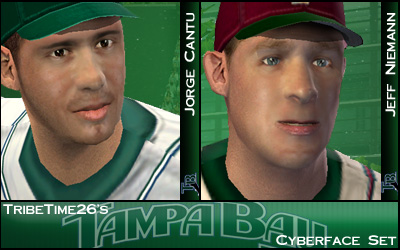
TribeTime26s Jorge Cantu & Jeff Niemann Cyberface Pack v1.1
By Kriegz
Here are the face IDs of the players you will need to assign in MVPEdit (MLB) Tampa Bay Devil Rays 2B- Jorge Cantu - 397 (A) Visalia Oaks SP- Jeff Niemann - 741 HOW TO INSTALL: Please BACKUP MODELS.BIG in case in error occurs with the faces There are a few different methods to install these ------------------------------------- Method 1: 1.Extract contents of download to your MVP 2005 directory. 2.Double-click on install.bat. 3.Wait for install to load. DO NOT HAVE BigGui or gameplay loading during install. 4.Using MVPEDIT, assign the appropriate numbers to the players MAKE SURE YOU ASSIGN THE FACE ID NOT THE PHOTO/AUDIO ID 5.YOUR DONE! ------------------------------------- Method 2: 1.Extract contents of download to any folder 2.Open BigGUI, and open your Models.big file 3.Press Import and select all of the cybercace files, press ok 4.Find the files you just imported and make sure they are compressed, if not compress them using the compress option 5.Using MVPEDIT, assign the appropriate numbers to the players MAKE SURE YOU ASSIGN THE FACE ID NOT THE PHOTO/AUDIO ID 6.Done! ------------------------------------- Or you can use EAZip/EAGraphicsEditor to install them After they are installed, you can adjust the players skin tone to your preference using MVPEdit ------------------------------------- Special Thanks goes to: ZACH man you rule for a teacher to me which has made my work alot better. Thanks a ton man KC you are always there to critique my faces help out with the small kinks and to request headshapes. You are teh rule man it would not be possible without you JOGAR you do great work that I look up to and your tutorial got me started. Thanks man TERMINATOR KOREA you revolutionized the mirrored headhshape which I think is a lot mor detailed texture so thanks for that. Plus I used 1 or 2 headshapes off of downloads of your work TRUES AND ALL OF THE MODERATORS OF MVPMODS for making this such a good place to talk and make mods ----------------------------------- Thank you and enjoy my mod- Signed, TribeTime26
383 downloads
(0 reviews)0 comments
Updated
-

Victor Diaz cyberface by Jogar84
By jogar84
This is v2 of my Victor Diaz face. (#573) Read instructions to install and as always, back up models.big. enjoy!
678 downloads
(1 review)0 comments
Updated
-
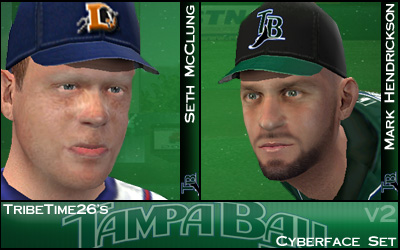
TribeTime26s McClung & Hendrickson Cyberfaces v2.0
By Kriegz
TribeTime26s Seth McClung & Mark Hendrickson Cyberface Pack v2.0 ****McClung cyberface credit goes KCCITYSTAR for tweaking the texture and making various improvements**** Here are the face IDs of the players you will need to assign in MVPEdit (MLB) Tampa Bay Devil Rays SP- Mark Hendrickson - 737 (AAA) Durham Bulls RP- Seth McClung - 732 HOW TO INSTALL: Please BACKUP MODELS.BIG in case in error occurs with the faces There are a few different methods to install these ------------------------------------- Method 1: 1.Extract contents of download to your MVP 2005 directory. 2.Double-click on install.bat. 3.Wait for install to load. DO NOT HAVE BigGui or gameplay loading during install. 4.Using MVPEDIT, assign the appropriate numbers to the players MAKE SURE YOU ASSIGN THE FACE ID NOT THE PHOTO/AUDIO ID 5.YOUR DONE! ------------------------------------- Method 2: 1.Extract contents of download to any folder 2.Open BigGUI, and open your Models.big file 3.Press Import and select all of the cybercace files, press ok 4.Find the files you just imported and make sure they are compressed, if not compress them using the compress option 5.Using MVPEDIT, assign the appropriate numbers to the players MAKE SURE YOU ASSIGN THE FACE ID NOT THE PHOTO/AUDIO ID 6.Done! ------------------------------------- Or you can use EAZip/EAGraphicsEditor to install them After they are installed, you can adjust the players skin tone to your preference using MVPEdit ------------------------------------- Special Thanks goes to: ZACH man you rule, a teacher to me which has made my work alot better. Thanks a ton man KC you are always there to critique my faces help out with the small kinks and to request headshapes. You are teh rule man it would not be possible without you JOGAR you do great work that I look up to and your tutorial got me started. Thanks man TERMINATOR KOREA you revolutionized the mirrored headhshape which I think is a lot mor detailed texture so thanks for that. Plus I used 1 or 2 headshapes off of downloads of your work TRUES AND ALL OF THE MODERATORS OF MVPMODS for making this such a good place to talk and make mods ----------------------------------- Thank you and enjoy my mod- Signed, TribeTime26
249 downloads
(0 reviews)0 comments
Updated

-
Top Downloads
Week
Month
Year
All Time
-
-
-
Download Statistics



(1).thumb.png.277f361fc5107dbac2de53e96055c80d.png)